Understanding your Council Tax bill
Every year in March we send out your yearly Council Tax bill.
Your bill details:
- who is liable
- the charge for the year
- any discounts, reductions or exemptions you have claimed
- your instalment dates and amounts
- any outstanding payments you may owe us for previous years
We may send out more bills throughout the year if anything changes with your account.
Example bill
If you've downloaded a copy of your bill from your online account, the format will be slightly different to what is pictured below but all the information will be the same.
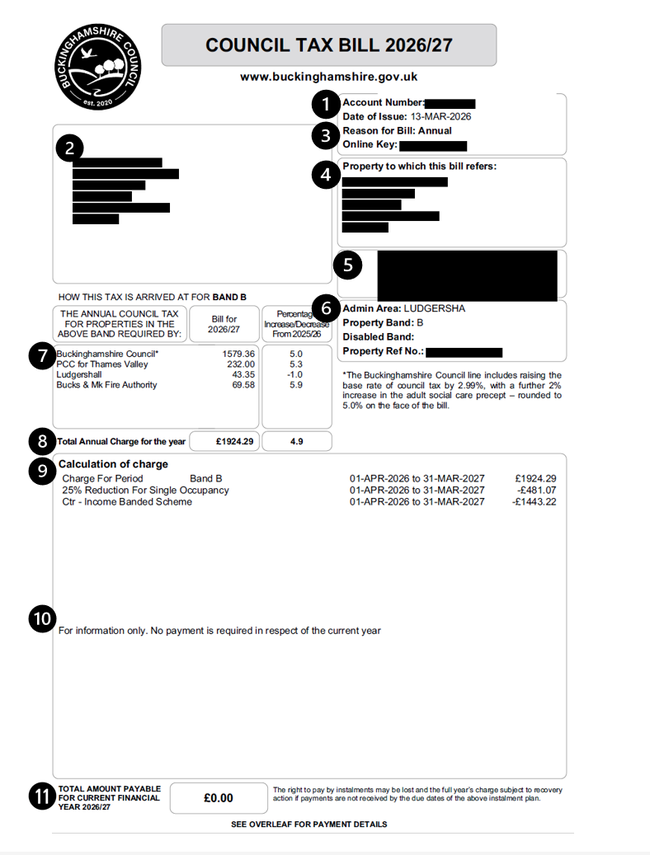
Example Council Tax bill
1. Account number
Your account number is displayed at the top of your bill. You can use this to register for an online account to access your bills online.
2. Name and address
The top left box on your bill will be addressed to the name of the Council Tax payer, this may be more than one person.
If you think someone else who lives at the property should be named, you can ask us to add them to the bill.
It will also display the Council Tax payers address.
If your bill is addressed ‘To the Council Tax payer’
If you’ve recently moved house and you receive a letter addressed ‘To the Council Tax Payer’ at your new address, it usually means we're trying to confirm who is now responsible for Council Tax at that property.
You should tell us you’ve moved by completing an online ‘moving home’ form. This will help us to understand who is in the household and if you're entitled to any discounts, disregards or exemptions. We can then make sure that the bill we send you is for the correct amount.
If you're a landlord and your tenants have just vacated, contact us to arrange for your name to be added to the bill.
3. Reason for bill, date of issue and online key
The reason for bill could be:
- annual: a bill that you receive at the start of the financial year (April to March)
- pay method: any change to the way payments are made (for example, set up or cancellation of Direct Debit or instalments changing from 10 monthly to 12 monthly)
- void exemption: any change which applies, changes or removes an exemption
The date that the bill was issued is shown as well as your online key.
Your online key can be used to register for an online account. The online account allows you to view your bills online and update your direct debit.
The online key changes every time a bill or notice is issued for security reasons so make sure to use your latest bill when registering for an account online.
4. Property to which this bill refers
This is the address that the Council Tax bill relates to.
If you're a landlord being billed for an empty property that you normally rent out or own a second home, this will show that properties address.
5. Barcode
The barcode is required if you choose to make a payment at a Post Office or any PayPoint outlet. You can find your nearest PayPoint location online.
Barcodes are not available on eBills.
6. Admin area, bands and property reference
Admin area refers to the parish or town you live in.
Property band refers to your Council Tax band which is decided by the Valuation Office Agency.
Disabled band will only show if you're in receipt of a disabled band reduction.
The property reference is a unique number to identify a property on our system and with the Valuation Office Agency.
7. How your Council Tax is spent
This shows the breakdown of where your Council Tax Payments will go and the percentage change for each since the last financial year.
8. Total annual charge
This section shows your annual charge for the financial year and the percentage change for the year before. This is the charge before any reductions or discounts are applied.
Council Tax charges are set each financial year by the council and depend on:
- the parish or town you live in
- what band you are
9. Calculation of charge
This section shows your annual charge as well as the different discounts or premiums that you have claimed.
If you receive a bill part way through the year, it will also show any payments you have made at the date of issue.
Some common Council Tax adjustments are:
Discounts, exemptions and disregards
The following refer to discounts, exemptions and disregards:
- Disabled Band Reduction
- Exempt (for all exemptions), for example:
- Exempt: Class E Residential Care
- Exempt: Class N Student Household
- 0% Empty & Unfurnished: there is no discount for empty and unfurnished property
- Prescribed Class B Disc Unocc/Furn (0%) – no discount, furnished but not a main residence (second home)
- % Reduction Description – for all disregards, for example:
- 25% Reduction for a Carer
- 25% Reduction for Severe Mental Impairment
Council Tax Reduction
The following refer to Council Tax Reduction:
- CTR – Income Banded Scheme: Council Tax Reduction for working age people which is a local scheme
- CTR – National Pension Age Scheme: Council Tax Reduction for pension age scheme defined by Government
Empty property premiums
The following refer to empty property premiums:
- Prem - Long Term Empty Over 1 Year
- Prem - Long Term Empty Over 2 Years
- Prem - Long Term Empty 5 To 10 Years
- Prem - Long Term Empty More Than 10 Years
If your circumstances have changed
If you believe a discount, reduction or premium no longer applies, contact us to let us know within 21 days of any change.
10. Payment schedule and memorandum note
Section 9 shows your payment schedule which sets out when each instalment is due to be paid. It will also show if you have a Direct Debit set up already and when this will be taken.
You can make changes to your Direct Debit, including the date you pay or how many months you pay across (10 or 12 months) by signing into your online account.
The memorandum note shows any credits or balance to be paid on your account.
If your account shows a credit, you can request a refund.
Any unpaid balance left on your account for the previous financial year will need to be paid separately and not as part of the current year's instalments.
11. Total amount payable
This shows the total amount payable once all discounts, reductions or premiums have been applied to your account and any previous payments have been taken into account.