Signing into your Council Tax account
Make sure you have an account
You’ll need to create an online account for Council Tax before you can sign in.
If you do not have an online account, or have never logged in before, you’ll need to create a new Council Tax account.
How to sign into your account
1) Visit our Council Tax portal and select 'sign in'
Visit the Council Tax portal and select the 'Sign in/Register/View my account' option from the menu list.
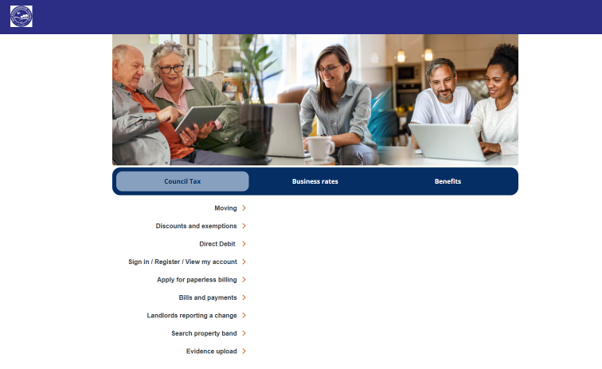
2) Fill in your log in credentials and select the 'Generate Code' button
Fill in your username and password and select the 'Generate Code' button. This will send a unique 6 digit code to the email that is associated with your account.
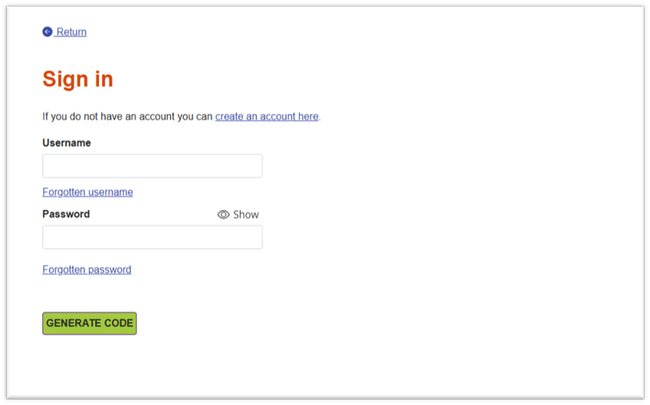
A view of the Council Tax sign in page
3) Check your email and input the code
Once you have selected 'Generate Code' you will be sent an email containing a 6 digit code. You will have 15 minutes to enter this onto the screen and select sign in.
Once you've followed the steps you will be signed into your account.
If you haven't inputted the code within the 15 minute timeframe, you have the option to resend a new code which will then be valid for another 15 minutes.
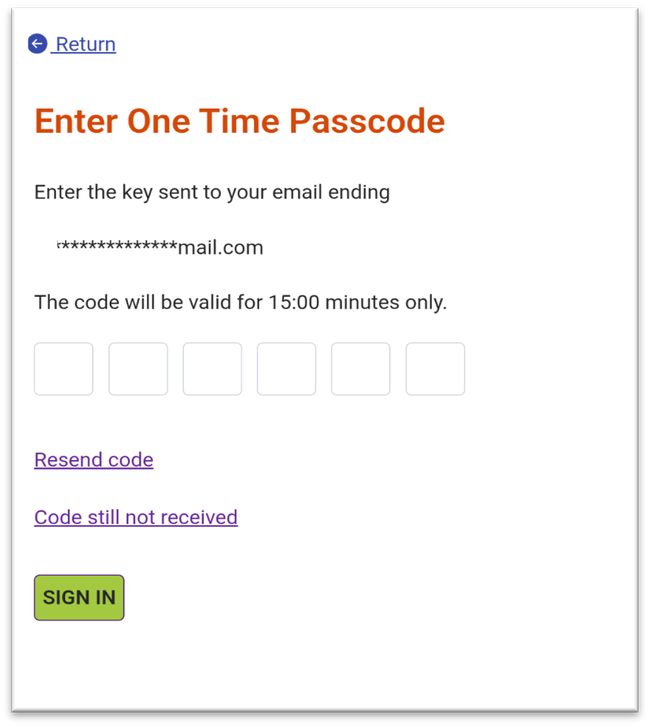
A prompt to check your email for a one-time passcode that you will need to enter onto this screen
If you're struggling to sign in
Check you’re using the correct username
Your username could be your email address or something else you set up.
If you’re unsure, you can request to have your username emailed to you.
Select ‘Forgotten username’ to verify.
This screen will ask for the email address you used when you set the account up.

Reset your password
Only select ‘Forgotten your password’ if you know your username or have requested it via email.

If you have used the correct username and pressed ‘Submit’, you’ll receive an email with a link to reset your password.
If you’re unable to select the link, you can copy the entire link, including the ‘https’ part at the front, into your browser.
If you do not receive a password reset email
Make sure you check to see if:
- the emails were sent to a ‘spam’ or ‘junk’ folder
- the emails were blocked by a company server or quarantined
- you entered your email address correctly
If you cannot reset your password or sign in
If the above steps still do not work, create a new account with a different user name.
You should consider using your email address as the username to make it easier to access in the future.